If you’re building a home media server with Jellyfin, Kodi, Plex, Emby, or whatever your flavor, you quickly run into the same question everyone does:
How do I actually get the media?
For most people, the choice comes down to Usenet or torrenting. They both work, are popular and they both can be automated. But they feel very different once you actually live with them day to day.
I used torrents for years. They worked, but between sketchy files, malware scares, dead downloads, and always needing a VPN, I eventually hit a point where I just wanted something easier, even if it cost a few extra dollars a month.
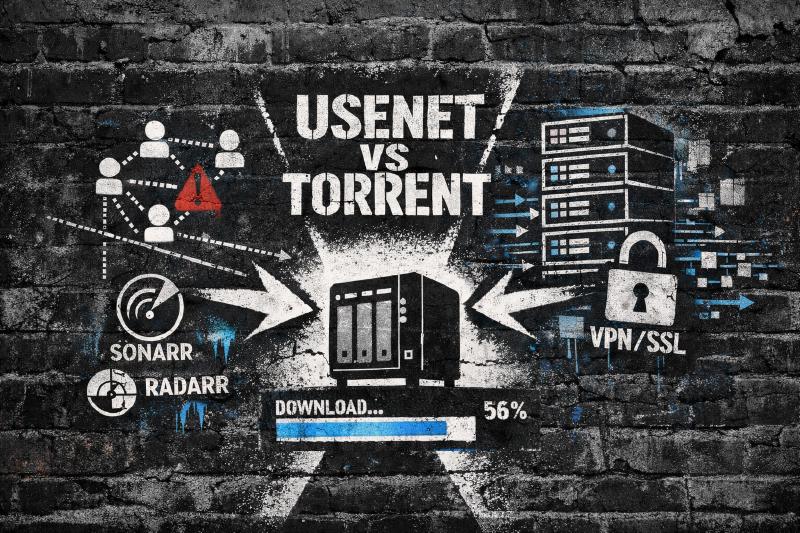
This post breaks down the Usenet vs torrent comparison, so you can make the choice between these systems for your media server, without hype or gatekeeping. You’ll learn which system fits your priorities: speed, cost, privacy, or automation and what trade-offs each one brings.
Quick Comparison: Usenet vs Torrent
| Factor | Torrents | Usenet |
|---|---|---|
| Cost | Free (VPN ~$5/mo) | ~$10-15/mo total |
| Speed | Depends on seeders | Maxes your connection |
| Privacy | VPN required | SSL encrypted (No VPN needed) |
| Automation | Good with setup | Excellent |
| Old content | Depends on seeders | Up to 18 years or more retention |
| Setup complexity | Simple | Moderate |
Usenet vs Torrenting: What Are You Really Choosing?
Before we compare pros and cons, let’s talk about what problem each system actually solves.
Torrents (P2P downloading)
Torrents use peer-to-peer sharing. When you download a file, you’re pulling pieces from other users (seeders) who already have it, while also uploading pieces you have to others. It’s a community effort, which sounds great until you realize that means you’re dependent on that community to share the content you want.
You usually need:
- A torrent client like qBittorrent
- A tracker (public or private)
- A VPN if you care about privacy (unless you like getting nasty letters in the mail from your ISP)
Usenet (NZB-based downloading)
Usenet uses centralized servers run by providers. Files are uploaded once, then stored for years. When you download, you pull directly from those servers using an NZB file as a map. No peers, no sharing, just a direct line to the content.
You usually need:
- A Usenet provider (paid)
- An indexer (to find content, usually paid)
- A downloader like SABnzbd or NZBGet
Look, if this sounds more complex, it can be at first. But it also unlocks a lot of automation that makes your life way easier down the road.
If you want the deeper history? Check out these other posts:


Torrents: Pros, Cons, and Reality in 2026
Pros of Torrents
- Free to use - No subscriptions needed (though you’ll want a VPN)
- Huge content library - Almost anything popular has been torrented
- Resumable downloads - Pick up where you left off, even days later
- Simple starting point - Install client, click magnet link, done
Cons of Torrents
Here’s where it gets real.
- Speed depends on seeders - Few seeders means slow or dead downloads. You’ll sit there watching a 4K movie crawl at 200KB/s because three people are seeding and two of them are on dial-up. Okay, maybe not dial-up, but it feels like it.
- Privacy exposure - Your IP is visible to peers and trackers. Everyone can see you.
- Higher legal risk - Copyright monitoring is easier with P2P. Those cease-and-desist letters? They come from torrent activity.
- Dead torrents happen - If nobody seeds, the file is gone. I’ve spent hours hunting for a specific release only to find every torrent has zero seeders.
- Sketchy files exist - Public torrents can include malware or junk. You wanted a movie, you got a .exe file. Do not run any executable files found in torrents.

Acts as a robust Jellyfin/Plex client and server, making it easy to stream downloaded content to your TV.
Usenet (NZB): Pros, Cons, and Why It Feels Different
Pros of Usenet
- Very fast downloads - Direct from high-bandwidth servers. You can max out your gigabit connection, every single time. No waiting, no hoping someone seeds.
- Better privacy by default - SSL encryption, no peer exposure. You’re not broadcasting to strangers.
- Long retention - Top providers offer 18+ years of file storage. That obscure show from 2008? Still there.
- Excellent automation - Pairs seamlessly with Sonarr, Radarr, and the rest of the *arr stack. Set it and forget it.
- Consistency - If the NZB exists and your provider has it, it downloads. No “check back later, maybe someone will seed.”
Cons of Usenet
Nothing’s perfect.
- It costs money - $7.50-20/month for unlimited plans. For some people, that’s a dealbreaker. I get it.
- More pieces to set up - Provider + indexer + downloader. It’s not complicated, but it’s more than “install qBittorrent.”
- DMCA takedowns happen - Content can be removed faster than torrents. Popular stuff gets hit within hours sometimes.
- Retention is not infinite - Files age out after many years.
- Sketchy files still exist - Although I have encountered less on Usenet, they do still exist. Do not run any executable files found in NZBs.
Privacy and Safety
Let’s talk about what actually protects you, because there’s a lot of misinformation out there.
Torrents and VPNs
If you torrent, a VPN is basically mandatory. But here’s what most guides skip: bind your torrent client to the VPN interface. This prevents downloads if the VPN disconnects (Also known as a kill switch).
Without this, your real IP can leak during connection drops. And it will drop. VPNs aren’t perfect. I learned this the hard way when my ISP sent me a friendly letter about a download that happened during a very short VPN hiccup.
Five minutes setting up interface binding saves you from that.
Usenet Privacy Limits
Usenet feels more private because you’re not sharing with peers, and SSL encrypts the connection. But let’s be clear: providers still log your activity, and your payment method links to your identity.
SSL only protects data in transit, not metadata about what you downloaded. If someone really wants to know what you’re doing, they can find out. It’s just way harder than with torrents, where your IP is literally broadcast to everyone.
NZB vs Torrent: Indexers and Trackers Explained
This is where many beginners get confused, so let me break it down.
Torrent Trackers
Trackers coordinate who has which pieces of a file. They’re like a phonebook for the swarm.
- Public trackers are easy but unreliable. Anyone can use them, which means quality varies wildly.
- Private trackers are reliable but invite-only. You’ll need to maintain a ratio (upload as much as you download) or get kicked.
Trackers don’t host files. They just help peers find each other. When a tracker goes down, your torrents stop working until it comes back.
Usenet Indexers
Indexers catalog Usenet posts and generate NZB files. Think of them as search engines for Usenet.
- Good indexers show completion rates, file health, and categories
- Some are free, some require invites, some cost money
- You’ll want at least two indexers for coverage
Indexers make Usenet automation work, especially with Prowlarr (which manages all your indexers in one place). Without a good indexer, Usenet is basically useless.

Decision Guide: Usenet vs Torrenting for Your Setup
Alright, so which one’s right for you?
Choose Torrents if:
- You want zero monthly cost and don’t mind the VPN subscription
- You’re comfortable using a VPN at all times (and binding it properly)
- You mainly download popular, well-seeded content
- You don’t mind occasional dead or slow downloads
Choose Usenet if:
- You want fast, consistent downloads without the seeder lottery
- You value privacy without mandatory VPN usage
- You want full automation with media management tools
- You’re okay paying a small monthly fee for the convenience
Budget reality check
If your budget is under $10 per month, here’s what I’d do:
Try Usenet free trials first. Most providers offer them. See if it works for you. If it feels too complex or limited, fall back to torrents + VPN. There’s no shame in that. Torrents still work, they’re just more hands-on.
Basic Setup Overview (High Level)
Let’s walk through what you’re actually signing up for with each system.
Torrent setup in practice
- Install qBittorrent
- Subscribe to a VPN and bind the client to VPN interface (seriously, do this)
- Add trackers (public or private)
- Optional: connect Sonarr (TV shows) and Radarr (movies) via Prowlarr
What success looks like: You click a magnet link, the download starts immediately, and your VPN shows as connected. If you disconnect the VPN, downloads pause automatically.
If downloads are slow, check seeders. If there are fewer than 10, expect problems. That’s just how P2P works.
Usenet setup in practice
- Choose a provider (trial first—don’t commit until you’ve tested)
- Join one or two indexers
- Install SABnzbd or NZBGet
- Add provider details, enable SSL
- Connect Sonarr and Radarr via Prowlarr
What success looks like: You add a show to Sonarr, and within minutes it’s downloading at full speed. No waiting, no checking seeders, just done.
If speeds are slow, check that you’re on an unlimited plan and using enough connections (20-60 depending on provider). Some providers throttle if you’re not using their recommended settings.
Hybrid Approach: Best of Both Worlds
Here’s what many experienced homelab users actually do:
- Usenet as primary for new and popular media
- Torrents as backup for rare or niche content
This gives you speed and automation without losing coverage. Sonarr and Radarr can search both simultaneously, grabbing from whichever source has the best release.
I’ve been running this setup for 10 years. Usenet handles 95% of my downloads, torrents catch the rest. It’s the best of both worlds, and honestly, once you’ve got it configured, you forget it’s even there.
Troubleshooting Common Problems
You’re going to hit issues. Everyone does. Here’s how to fix the most common ones.
| Problem | System | Solution |
|---|---|---|
| Downloads are slow | Torrents | Check seeders (need 5+), try different tracker, verify VPN isn’t throttling |
| Downloads never finish | Torrents | Dead torrent. Look for different release with active seeders |
| Downloads are slow | Usenet | Confirm unlimited plan, increase connections (20-60) |
| NZBs fail or missing blocks | Usenet | DMCA takedown. Try different indexer or provider |
| No results in Sonarr/Radarr | Both | Sync Prowlarr, check indexer categories, verify retention settings |
FAQs: Usenet vs Torrent Questions
➤ What is the difference between NZB vs torrent files?
➤ Do I need a VPN with Usenet?
➤ Are there free Usenet providers?
➤ Why do torrents die, but Usenet files last years?
➤ Which is better for old or rare content?
Final Verdict: Usenet vs Torrenting
The Usenet vs torrenting debate really comes down to what you value.
Torrents are free, familiar, and still useful. But they come with trade-offs: slower speeds, privacy risks, dead files, and the constant need for a VPN.
Usenet costs money, but in return you get speed, privacy, automation, and reliability. For me, that trade was worth it. I stopped worrying about sketchy downloads and just let my media server do its thing.
If you’re brand new, try both. Use trials. Break things. Learn what annoys you. Then make your decision.
That’s how you end up with a setup you actually enjoy using.